- ×
 Rumah - Construction Theme Elementor Template Kit 1 × $4.99
 - ×
 EventOn Event Tickets 1 × $4.99
 - × Meta Box AIO 1 × $4.99
- × BuddyPress User Badges 1 × $4.99
- × WP Review Pro - MyThemeShop 1 × $4.99
- × Product Loops for WooCommerce 1 × $4.99
- × Heroic Knowledge Base Plugin by HeroThemes 1 × $4.99
- × FooGallery PRO Expert 1 × $4.99
- × CobaltApps Themer Pro Plugin 1 × $4.99
- × WooMail WooCommerce Email Customizer 1 × $4.99
- × Download Manager Pro Block Hotlink 1 × $4.99
- × Advanced Woo Search Pro 1 × $4.99
- × WordPress Preloader Unlimited 1 × $4.99
 EventOn Event Tickets
  Meta Box AIO
  BuddyPress User Badges
  WP Review Pro - MyThemeShop
  Product Loops for WooCommerce
  Heroic Knowledge Base Plugin by HeroThemes
  CobaltApps Themer Pro Plugin
  Download Manager Pro Block Hotlink
  WordPress Preloader Unlimited
 98%
WooCommerce Product Stats and Related
Original price was: $49.99.$4.99Current price is: $4.99.
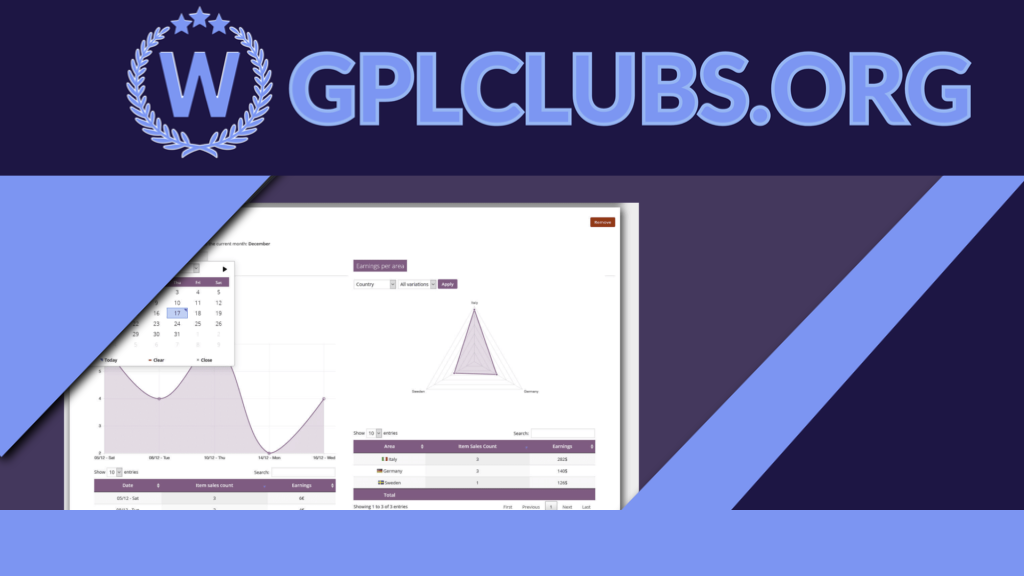
The WooCommerce Product Stats and Related! (WCPST) plugin gives to the shop admin a set of very intuitive and detailed products stats. All the stats you may need, at your fingertips.
Version: 3.2
Last Update: September 11, 2021
Description
The WooCommerce Product Stats and Related! (WCPST) plugin gives to the shop admin a set of very intuitive and detailed products stats. All the stats you may need, at your fingertips.
HOW IT WORKS
Its very easy, once installed and activated, you will find a new Stas menu voice under Products menu voice. Once there, you will be able add Products cards in which are reported product stats like:
Product earnings per period (daily, monthly, early)
Product earnings per country/province
Product earnings per customer
Product earnings per payment method
Best related product (the most purchased products with the selected product)
Shop admin can add multiple cards related to different product or the same product (with different time periods)
CONFIGURABLE TIME PERIODS
All stats are filtrabe by time period, in this way the shop admin can retrieve the stats for a single day or for the entire shop live time!
VARIABLE PRODUCTS COMPATIBILY
WCPST will also display products stats even for single variation!
STATS LINK ON PRODUCT LIST PAGE
WCPST will add a new stats column on product list page. In this way the shop admin can easily access the product stats page.
RELATED PRODUCTS LIST OVERRIDE
WooCommerce shows on product page, by default, a list of related products. However these products are just products that belog to the same category.
The WCPST overrides seamlessly the default behavior populating the list with real related products. This is done analizyng orders and finding which are the most purchased products together with the current one!
Further more, using theWooCommerce->Stats – general optionsmenu, is possible to disable this feature or set the time span used to compute the related products or, in case there arent any related products, show as related products the ones which belongs the the same category (normal behavior).
NOTE:This feature requires that a product belongs to a category with at least 2 elements otherwise the default function is not even called so it cannot be overridden.
You can found it at quite the top of the template. In this case the override will always be working.
PURCHASE PRICE FOR A MORE ACCURATE EARNING CALCULATION
For every product and variant (only for WC > 2.5) the shop admin can specify a Purchase price. Specifying this value, WCPST can calculate earnings in a more accurate way. Infact for every stat, the earning values will be computed as sale_price – purchase_price.
Related products
98%

Original price was: $49.99.$4.99Current price is: $4.99.
An easy-to-use plugin for adding distinctive page transitions and preloader animations to your website is called Titan Preloaders & Page Transitions. It may improve the overall user experience on your website and has a wide range of beautiful options to select from.
98%

Original price was: $49.99.$4.99Current price is: $4.99.
The best WordPress gallery plugin available is FooGallery PRO Nulled. This well-known gallery plugin features stunning gallery layouts, is responsive, retina-ready, lightning fast, and simple to use.
98%

Original price was: $49.99.$4.99Current price is: $4.99.
Form Lock Plugin for WordPress Download Manager helps you to lock your download with a form so that users need to fill and submit that form to get access to download. As sometimes, you may need to collect data from visitors before they get the download. This add-on will link WordPress Download Manager Downloads with the forms built using popular WordPress Form Builder Plugins.
98%

Original price was: $49.99.$4.99Current price is: $4.99.
A responsive property listing WordPress plugin for full-featured real estate websites and portals is called Real Estate Manager. It adds unique integration features like Property Types, Property Video, Gallery Slider, Advanced AJAX Search, Google Maps with property location markers, Properties Carousel, Grid listing, Front End Property Submission, Search Widget, Mortgage Calculator, Front End Profile Editing, easy to use settings, and much more. It has nice & clean designs for property templates.
98%

Original price was: $49.99.$4.99Current price is: $4.99.
WooCommerce Abandoned Cart Recovery is a WooCommerce extension which helps you to recovery unfinished order in your store. When a customer adds a product to cart but does not complete check out. After a scheduled time, the cart will be marked as “abandoned”.
98%

Original price was: $49.99.$4.99Current price is: $4.99.
For each user, display a separate piece of content. To offer your visitors individualized material, use dynamic content.
98%

Original price was: $49.99.$4.99Current price is: $4.99.
WooMail - WooCommerce Email Customizer Allows You To Customize An Email Template In Order To Professionally Resonate With Your Brand‚ Under 7 Minutes (Oh, no coding language is required).
98%

Original price was: $49.99.$4.99Current price is: $4.99.
WordPress Events Plugin is perfect for those that need to create seminars, events, classes, workshops, conferences, concerts, and just about any type of events for existing websites. Manage your events, keep track of attendees, and sell tickets all from the admin section of WordPress. With an easy to use admin interface and an extensive documentation you will be able to setup your events in no time.
98%

Original price was: $49.99.$4.99Current price is: $4.99.
You are looking for a solution to synchronize data between your online website and your local store; you are looking for a quick solution to manage your cafe/restaurant. OpenPOS is a must have Plugin to do that. OpenPOS is a complete point of sale system(POS) plugin for WooCommerce and WordPress. OpenPOS can be used for multi purposes like as Retailers Stores / Restaurant / Cafe / Spa salon. OpenPOS includes everything you need for a Point Of Sale system.
98%

Original price was: $49.99.$4.99Current price is: $4.99.
For WooCommerce, Advanced Custom Fields is an all-in-one plugin to manage Woocommerce‚s custom areas. No expertise in coding is required. It encourages conditional reasoning, confirms fields and nearly 30 forms of areas as well.
98%

Original price was: $49.99.$4.99Current price is: $4.99.
ToolKit for Elementor is a user-driven framework that focuses on Site Performance, Workflow Productivity, and reducing plugin & theme dependence.
98%

Original price was: $49.99.$4.99Current price is: $4.99.
Advanced WooCommerce Product Search Enhance your users‚ search experience with advanced WooCommerce product search.